
Task Template
A task template can be created for each task, which is periodically performed as part of a workflow process. A workflow manager can quickly add a task to a workflow by selecting its template, and the information from which will be used to populate the fields of a new task.
Task templates can be linked to workflow templates. When a workflow template is used to register a new workflow, a new task will be created and linked to the workflow for each task template associated with that workflow template.
When a new workflow template is created within a space, one task template for executing that order will be automatically created.
Only a person with the role workflow manager role in the space can maintain these task templates.
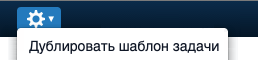
Using the "Duplicate Task Template" option in the action menu, the workflow manager can copy information by selecting an existing task template and pasting it into a new task template.
The [fields/task_template_fields.md] page provides recommendations for using each field in the task template form.