

REST API
Bu içerik henüz dilinizde mevcut değil.
R-Service REST API - Introduction
Заголовок раздела «R-Service REST API - Introduction»This page offers an introduction to the REST (or Representational State Transfer ) API of the R-Service service. This API is used for retrieving, creating and updating R-Service records like Requests, Workflows, CIs, Services, SLAs, People, etc.
The following topics are covered in this introduction:
- Service URL
- Schema
- HTTP Verbs
- Mime Type
- Authentication
- Multiple Accounts
- Internationalization
- Rate Limiting
- Error Codes & Responses
Information about generic REST API functionality like Pagination or Filtering , can be found in the submenu below the General option on the right. The Libraries page offers links to client libraries to simplify usage of the REST API.
Service URL
Заголовок раздела «Service URL»The R-Service API requires a point of entry service URL that references the instance of a specific environment and region:
| Instance | Environment | Region |
|---|---|---|
https://api.r-service.tech/v1 | Production | Global |
https://api.qa.r-service.tech/v1 | Quality Assurance | Global |
https://api.demo.r-service.tech/v1 | Demo | Global |
Please note the use of https:// in the URL above. All R-Service API communication is encrypted over HTTPS. Any non-secure requests are automatically rejected, so we recommend establishing a test connection with the secure API entry point before sending sensitive data.
$ curl -i https://api.r-service.tech/v1Status: 200 OKContent-Type: application/json; charset=utf-8Content-Length: 2{}All data is sent and received as JSON.
$ curl -i https://api.r-service.tech/v1/meStatus: 200 OKContent-Type: application/json; charset=utf-8X-RateLimit-Limit: 3600X-RateLimit-Remaining: 3542Content-Length: 2198{ "name": "My User Name", "site": { "name": "My Site Name", "id": 13 }, "...": "..."}See the Data Types section for detailed information on the formatting of the values.
HTTP Verbs
Заголовок раздела «HTTP Verbs»The API is RESTful, meaning that the HTTP verbs are used for specific actions.
GET
Used for retrieving resources.
POST
Used for creating resources, or to link resources.
PATCH
Used for updating resources with partial JSON data. PATCH is a relatively new and uncommon HTTP verb, so resource endpoints also accept PUT requests.
DELETE
Used to remove a resource from a collection.
Mime Type
Заголовок раздела «Mime Type»The only mime type the R-Service API supports is:
application/jsonR-Service does not define any custom mime types.
You may explicitly set the
Accept
header when you make a request
and/or end the path with
.json
. If both are omitted R-Service defaults
to returning a JSON response.
The following are all equivalent:
$ curl -H "Accept: application/json" https://api.r-service.tech/v1/me
$ curl https://api.r-service.tech/v1/me.json
$ curl https://api.r-service.tech/v1/me
Authentication
Заголовок раздела «Authentication»When you are using the R-Service REST API, it is always through an existing user in R-Service. There is no special API user. When authenticating as an existing user in R-Service, you can access the data that the user can access, and perform the actions that the user is authorized to perform.
Each request to the R-Service REST API must supply two HTTP headers:
Authorization: Bearer <oauth-token>account: <accountID>
You can obtain an OAuth token either by generating a Personal Access Token from My Profile in R-Service, or by creating an OAuth Application from the Settings console in R-Service.
The R-Service account ID value passed in the
account
header determines the current account that the API request will use.
Personal Access Tokens
Заголовок раздела «Personal Access Tokens»A personal access token is an OAuth Token, and must be provided as part of the Bearer Authentication:
$ curl -H "Authorization: Bearer <oauth-token>" \ -H "account: pro-product" \ https://api.r-service.tech/v1/meNote that for this example to work your personal access token must have added a scope to allow action
me - All
.
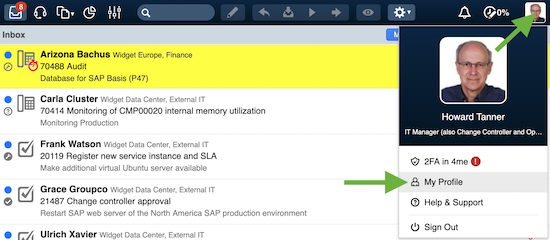
Your personal access tokens can be found by clicking on your avatar in the upper right corner, and selecting the menu option My Profile
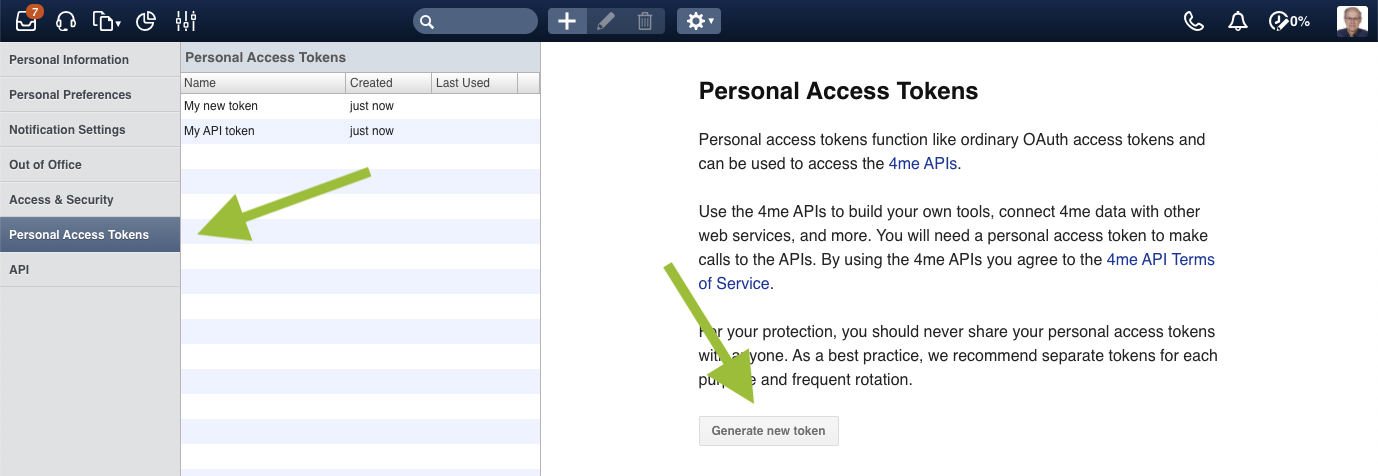
Open the Personal Access Tokens section, click on the Generate token button to generate a new token.
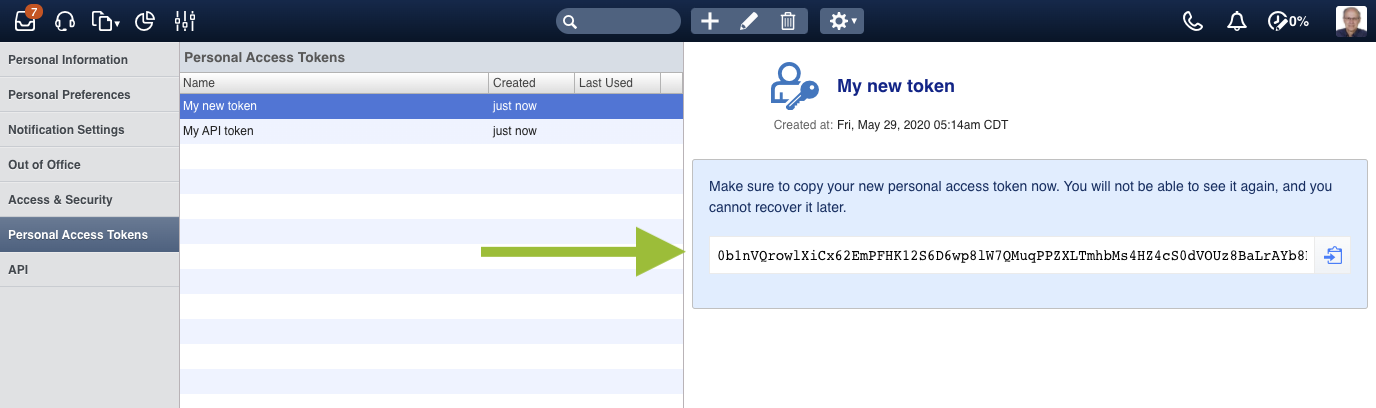
After saving the form, the new token is displayed:
Multiple Accounts
Заголовок раздела «Multiple Accounts»Often the account of the authenticated user has several trust relations with other accounts. As a result, resources from other accounts (mostly SLA’s, Requests, Teams and People) are accessible through the API.
Each reference to a resource that belongs to a different account will receive an
account
hash with the
name
and
id
of
that account, see
references
for more details.
Switching Accounts
Заголовок раздела «Switching Accounts»The authenticated user may have access rights to one or more trusted accounts.
To retrieve information from those accounts through the API, add the
account
header to the API request.
In this example the authenticated user has access to the Widget North America account:
$ curl -H "account: ru-it" https://api.r-service.tech/v1/sites?fields=nameStatus: 200 OK[ { "name": "Widget Data Center", "id": 14 }, { "name": "Widget International Headquarters", "id": 15 }, { "name": "Widget Manufacturing Center", "id": 16 }, { "name": "Widget Research & Development Center", "id": 17 }]And the Widget Europe account:
$ curl -H "account: weu-it" https://api.r-service.tech/v1/sites?fields=nameStatus: 200 OK[ { "name": "Widget European Headquarters", "id": 18 }]Internationalization
Заголовок раздела «Internationalization»Most API calls are language independent. In some cases the response contains translated values, e.g.:
- within the enumerations
- within validation errors
By default the language of the authenticated user is taken, see the
Personal Preferences
screen found
under the
Settings
menu in R-Service. To override this setting, add the
language
header
to the API request.
$ curl -H "language: nl" https://api.r-service.tech/v1/enumsStatus: 200 OK{ "request.status": [ { "id": "declined", "txt": "Geweigerd" }, { "id": "assigned", "txt": "Toegewezen" }, { "id": "accepted", "txt": "Geaccepteerd" }, { "id": "etc", "txt": "etc" } ], "etc": "..."}All supported language codes can be found via the
Enumerations
API, see the
language
key:
{ "language": [ { "id": "en-US", "txt": "English (United States)" }, { "id": "nl", "txt": "Nederlands" }, { "id": "fr", "txt": "Francais" }, { "id": "da", "txt": "Dansk" }, { "id": "et", "txt": "Eesti" }, "..." ]}Rate Limiting
Заголовок раздела «Rate Limiting»Authenticated API requests are associated with the authenticated user. Unauthenticated API requests are associated with the originating IP address, and not the user making requests.
The returned HTTP headers of an API request show the current rate limit status:
$ curl -i https://api.r-service.tech/v1/meStatus: 200 OKX-RateLimit-Limit: 3600X-RateLimit-Remaining: 3599X-RateLimit-Reset: 1533873527X-RateLimit-Limit
The maximum number of requests permitted to make in the current rate limit window.
X-RateLimit-Remaining
The number of requests remaining in the current rate limit window.
X-RateLimit-Reset
The time at which the current rate limit window resets in UTC epoch seconds .
If the reset time is needed in a different format then any modern programming language can be used to achieve this. For example, if opening up the console of a web browser, the reset time can be returned as a JavaScript Date object as follows:
new Date(1533873527 * 1000)=> Fri Aug 10 2018 03:58:47 GMT+0000 (UTC)You can check your rate limit status without incurring an API hit, but accessing this endpoint is limited to once per second.
Responding to Rate Limiting Conditions
Заголовок раздела «Responding to Rate Limiting Conditions»Once a rate limit window is exceeded an error response is returned and the
HTTP header
Retry-After
indicates how long to wait (in seconds) before
making a new request:
Status: 429 Too Many RequestsContent-Type: application/json; charset=utf-8Retry-After: 30{ "message": "Too Many Requests", "documentation_url": "https://developer.r-service.tech/v1/#rate-limiting"}This response instructs your app to wait 30 seconds before attempting to send a new request.
By programmatically evaluating the
Retry-After
header you can wait for the indicated number
of seconds before retrying the same request.
HTTP Status Codes
Заголовок раздела «HTTP Status Codes»The R-Service API attempts to return appropriate HTTP status codes for every request.
- Success!
$ curl https://api.r-service.tech/v1/meStatus: 200 OKContent-Type: application/json; charset=utf-8204 No Content
Заголовок раздела «204 No Content»- Success, no data to return
$ curl https://api.r-service.tech/v1/meStatus: 200 OKContent-Type: application/json; charset=utf-8304 Not Modified
Заголовок раздела «304 Not Modified»- There was no new data to return
$ curl -H 'Etag: 1234567890' https://api.r-service.tech/v1/meStatus: 304 Not ModifiedContent-Type: application/json; charset=utf-8400 Bad Request
Заголовок раздела «400 Bad Request»- Incorrect parameter values or syntax error in JSON
$ curl -i https://api.r-service.tech/v1/cis?per_page=-10Status: 400 Bad RequestContent-Type: application/json; charset=utf-8{ "message": "Parameter 'per_page' cannot be less than 1"}401 Unauthorized
Заголовок раздела «401 Unauthorized»- Invalid or missing authentication credentials
$ curl -i -u "user:invalid" https://api.r-service.tech/v1/meStatus: 401 UnauthorizedContent-Type: application/json; charset=utf-8{ "message": "Unauthorized"}403 Forbidden
Заголовок раздела «403 Forbidden»- Access to resource is not allowed with current credentials
$ curl -i https://api.r-service.tech/v1/people/1Status: 403 ForbiddenContent-Type: application/json; charset=utf-8{ "message": "Forbidden"}404 Not Found
Заголовок раздела «404 Not Found»- The URI is invalid or the resource requested does not exist
$ curl -i https://api.r-service.tech/v1/me_tooStatus: 404 Not FoundContent-Type: application/json; charset=utf-8{ "message": "Not Found"}406 Not Acceptable
Заголовок раздела «406 Not Acceptable»- URI is known but does not accept JSON API requests
$ curl -i https://api.r-service.tech/v1/account/billingStatus: 406 Not AcceptableContent-Type: application/json; charset=utf-8{ "message": "Not Acceptable"}422 Unprocessable Entity
Заголовок раздела «422 Unprocessable Entity»- Semantic error in provided data
$ curl -i -X POST -F impact=medium https://api.r-service.tech/v1/requestsStatus: 422 Unprocessable EntityContent-Type: application/json; charset=utf-8{ "message": "Validation Failed", "errors": [ [ "subject", "Subject can't be blank" ], [ "category", "Category can't be blank" ] ]}The validation errors are tuples with the field name and a localized error message. Note that a single field may yield multiple validation errors.
429 Too Many Requests
Заголовок раздела «429 Too Many Requests»- Rate Limit Exceeded
Status: 429 Too Many RequestsContent-Type: application/json; charset=utf-8X-RateLimit-Limit: 3600X-RateLimit-Remaining: 0X-RateLimit-Reset: 1533873527Retry-After: 30{ "message": "Too Many Requests", "documentation_url": "https://developer.r-service.tech/v1/#rate-limiting"}500 Internal Server Error
Заголовок раздела «500 Internal Server Error»- Something is broken. The R-Service team should investigate.
Status: 500 Internal Server ErrorContent-Type: application/json; charset=utf-8{ "message": "Internal Server Error"}502 Bad Gateway
Заголовок раздела «502 Bad Gateway»- R-Service is down or being upgraded
Status: 502 Bad GatewayContent-Type: application/json; charset=utf-8{ "message": "Bad Gateway"}503 Service Unavailable
Заголовок раздела «503 Service Unavailable»- The R-Service servers are up, but overloaded with requests. Try again later.
Status: 503 Service UnavailableContent-Type: application/json; charset=utf-8{ "message": "Service Unavailable"}504 Gateway timeout
Заголовок раздела «504 Gateway timeout»- The R-Service servers are up, but the request could not be serviced due to some failure at R-Service. Try again later.
Status: 504 Gateway timeoutContent-Type: application/json; charset=utf-8{ "message": "Gateway timeout"}If you see an error response which is not listed in the above table, then fall back to the HTTP status code in order to determine the best way to address the error.