

SCIM Mapping
Bu içerik henüz dilinizde mevcut değil.
SCIM Mapping
Заголовок раздела «SCIM Mapping»Background
Заголовок раздела «Background»The SCIM user interface defines a lot of fields for the user model. Identity data that is defined in the provisioning client is first mapped to one of these SCIM user fields. Then, in R-Service, the SCIM user fields are mapped to the fields of the R-Service person record .
Then, the SCIM group interface makes it possible to group users together. These groups are mapped by default to organizations and sites in R-Service, where all members of the SCIM group are linked to the corresponding organization or site in R-Service.
To ensure all information from the provisioning client is assigned to the right R-Service person fields it is imperative to know the details of the user mapping and the group mapping .
After the SCIM integration has been successfully tested in your QA account, it is possible to copy the R-Service mappings from QA to PROD .
User mapping
Заголовок раздела «User mapping»SCIM Users are mapped to people in R-Service. When a person record exists in the R-Service account that matches the primary email found in the SCIM user attributes, the existing person record is linked to the SCIM user. If the primary email is unknown, a new R-Service person record is created automatically. The attributes provided by the provisioning client will subsequently be used to fill or update the person’s fields in R-Service.
Most provisioning clients allow you to create a mapping from the data available in the provisioning client onto the SCIM User attributes.
The following SCIM attributes are used in the default R-Service user mapping . When more attributes are provided it is possible to use them in custom R-Service user mappings .
userName
Required [string] — The person’s primary email address.
displayName
[string] — The person’s name.
name.formatted
[string]
— The person’s name. Used when
displayName
is blank.
name.familyName
[string]
— The person’s last name. Used (together with
name.givenName
) when
displayName
and
name.formatted
are both blank.
name.givenName
[string]
— The person’s first name. Used (together with
name.familyName
) when
displayName
and
name.formatted
are both blank.
active
[boolean]
— If set to
false
the person will be disabled in R-Service.
title
[string] — The person’s job title.
locale
[string] — The person’s locale.
timezone
[string] — The person’s time zone.
userType
[string]
— Flag VIP’s by adding
VIP
(case sensitive) somewhere in this string.
[enterprise-extension].location
[string] — specific for R-Service The person’s location.
[enterprise-extension].employeeNumber
[string] — The person’s employeeID.
[enterprise-extension].manager.value
[string] — The person’s manager. Should contain the ID of a SCIM user in R-Service.
[enterprise-extension].organization
[string] — The person’s organization. Should contain the name of an existing organization in R-Service.
[enterprise-extension].site
[string] — specific for R-Service The person’s site. Should contain the name of an existing site in R-Service.
[enterprise-extension].supportID
[string] — specific for R-Service The person’s supportID.
emails
[array] — The person’s email addresses.
emails.value
[string] — The email.
emails.type
[string]
— The label. Valid values
work
,
home
and
other
.
emails.primary
[boolean] — Whether or not this is the primary email address.
phoneNumbers
[array] — The person’s phone numbers.
phoneNumbers.value
[string] — The phone number.
phoneNumbers.type
[string]
— Type of phone number. Valid values
work
,
home
,
mobile
,
fax
,
pager
and
other
.
addresses
[array] — The person’s addresses.
addresses.streetAddress
[string] — The address.
addresses.locality
[string] — The city.
addresses.region
[string] — The state.
addresses.postalCode
[string] — The zip code.
addresses.country
[string] — The country.
addresses.type
[string]
— Type of address. Valid values
work
,
home
and
other
.
Group mapping
Заголовок раздела «Group mapping»The default
SCIM Group
only defines the attributes
displayName
and
members
.
The
default R-Service group mappings
try to map the
displayName
to an existing
organization
or
site
in R-Service. If found, all members of the SCIM group are linked to the corresponding organization or site in R-Service. If not found the group will be stored as a SCIM group in R-Service but no further action is taken.
When automatic creation of organizations or sites in R-Service is favorable take a look at custom R-Service group mappings .
The following SCIM attributes are used in the default R-Service group mappings .
displayName
[string] — Name of existing organization or site in R-Service.
members
[array] — A list of members of the organization or site.
members.value
[string] — The organization or site member. Should contain the ID of a SCIM user in R-Service.
members.$ref
[uri] — The URI to the SCIM resource.
Copy mappings
Заголовок раздела «Copy mappings»After the SCIM integration has been successfully tested in your QA account, the R-Service account administrator can use the import/export functionality of R-Service to copy the R-Service mappings from QA to PROD.
Login to R-Service as an account administrator in your QA account and go to the Settings console. Open the Automation Rules menu and click on Export… in the Actions menu.
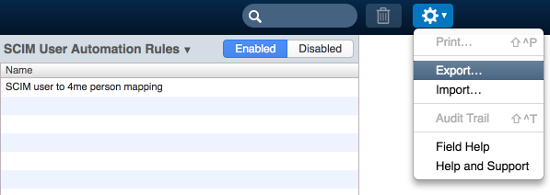
Select SCIM User Automation Rules and press Export .
Next, login to R-Service as an account administrator in your production account and import the file that was just exported.
Redo the same steps to copy the SCIM Group Automation Rules to the production account.