

OAuth - Client Credentials Grant
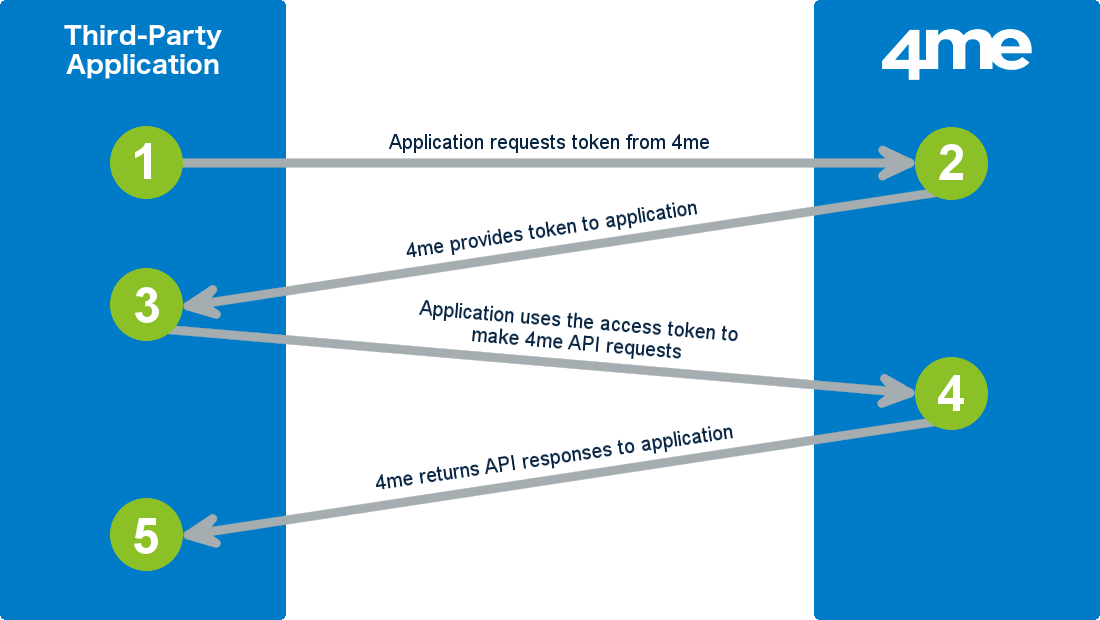
The image above illustrates the following 5 steps that complete an OAuth Client Credentials Grant flow from 3rd party applications:
-
The third-party application performs an access token request to request an access token. The following data is provided by the application:
- the client ID of the application record in R-Service, and
- the client secret of the application record in R-Service
-
R-Service then generates a temporary access token.
The access token allows the third-party application to retrieve data from R-Service using the user linked to the application. An access token is valid only for 1 hour.
R-Service returns the access token to the third-party application. 3. The third-party application uses the access token to make R-Service API requests. 4. R-Service returns API responses to the third-party application. 5. The third-party application uses the data received in the API responses to render a page for the user or perform a background action.
Access Token request
Заголовок раздела «Access Token request»POST https://oauth.r-service.tech/tokenParameters
Заголовок раздела «Parameters»client_id
Required string - The client ID that belongs to the application record registered in R-Service.
client_secret
Required string - The client secret you received from R-Service when you registered the application in R-Service.
grant_type
Required
string
- Must be set to
client_credentials
.
Response
Заголовок раздела «Response»Valid requests will receive a response with HTTP status code 200, containing:
access_token
Required string - Temporary OAuth access token. Allows the 3rd party application to retrieve data from R-Service on behalf of the user.
The token expires after 1 hour. The token becomes invalid when:
- the token belonging to the
client_idandclient_secretis disabled or deleted, - the application is disabled.
For invalid requests a error response with HTTP status code 400 will be returned, containing:
error
Required string - Code indicating why the request was invalid.
error_description
Optional string - Additional information on why the request was invalid.