
Spaces (accounts)
When an organization starts using the RR Tech Service Management (R-Service) system, a space (account) is created for it, where all the organization's records are stored, which initially only persons (accounts) related to this organization have access to.
If necessary, the organization can establish trust relationships (accounting relationships) with other spaces of the RR Tech Service Management (R-Service) system, which allows them to enter into service level agreements (SLAs) and first-line support agreements (FLSA). In addition, a trust relationship allows the administrator of the space (account) to make one or more roles (account roles) available to the trusted space.
Some organizations have multiple spaces: one can be used by a data center (data center), the rest by branches in different countries or regions. Data centers and IT departments of different branches are completely autonomous if each of them uses its own space. If necessary, they can restrict access to their data, but at the same time freely interact with other departments of the organization. The advantage of distributing data from data centers and various IT departments across different spaces is the ability for each department of the organization to independently configure its space without affecting the configuration of the spaces of other departments.
This opportunity to create separate spaces for each of its IT departments is very useful for the organization, and it makes sense for the organization to use it.
Account switcher (Switch spaces)
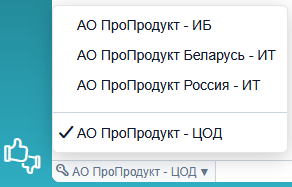
If a person has roles in different spaces and records of these spaces are available to them, then such a person can use the corresponding switch located under the view to switch between spaces. By default, the switch is set to the space to which the face entry belongs. If a person has access to several spaces, then there is a small triangle next to the name of the space displayed in the toggle.
Search in the space switch (Search in the Account switcher)
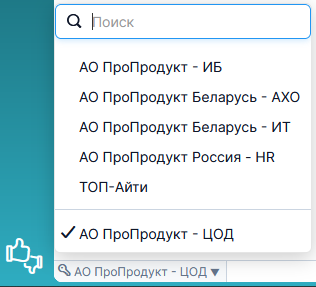
If a person has roles in 6 or more spaces, then the search bar becomes available in the space switch, with which you can quickly find and select the desired space. The search is performed both by the name of the space and by its ID.
Directory Account (Headspace) and Support Domain Account
If the RR Tech Service Management (R-Service) system is used by several support domains of the same organization (for example, the information technology department, the personnel department, and the building maintenance department), then such an organization usually creates a headspace (Directory Account) in which all records of the organization, individuals, and branches are recorded, and each of the support domains receives its own space. The support domain spaces are linked to the headspace, so that the support domains have access to all records of the organization, individuals, and branches of the headspace (Directory Account).
The advantages of creating a headspace are as follows:
- All employees of the organization have online access from a single self-service portal to the support domains that provide them with services.
- Each request is registered in the support domain for which it was submitted. Thus, only persons with roles in the space of the corresponding support domain have access to these requests.
Strict confidentiality
In a space for which the strict confidentiality option is enabled, the access of specialists to the requests, problems, tasks and tasks of the project assigned to their teams is limited. The approving person (in the case of the approval task) has access to the entire workflow. A person with the role of project manager has access only to those projects for which he is the head. The persons specified in the project task have access to the entire project.
If a request that has an internal comment and relates to a space that uses strict confidentiality is assigned to another space that has strict confidentiality disabled, then all specialists from the other space get access to the request but do not see the internal comment, even if this space belongs to the same headspace (DA) as the space with strict confidentiality.
End User Privacy
If a space uses the end user privacy option, then users associated with such a space cannot have roles. Spaces with the end-user privacy option are intended for end users only. As a rule, such spaces are used in government, trade, and educational organizations to register citizens, consumers, and students. These persons cannot mention or be mentioned by others, cannot register requests on their own behalf or on behalf of others, cannot be key contacts or representatives of the customer, and cannot see other persons in this space.